Mastering Digital Engagement with Webinar Social Media Graphics
Every digital marketing conference has that pivotal moment: the speaker shares a brilliant strategy, the audience is engaged, but the real challenge lies in translating that energy into the digital sphere. For small business owners and content creators, the gap between hosting a valuable webinar and ensuring it gets the traction it deserves often hinges on visual branding. You can have the most insightful content, but if your promotional materials look disjointed or generic, you risk losing credibility before the audience even clicks "join." The difference between a webinar that fills up and one that fizzles often comes down to the quality of the assets used to promote it across social platforms.
Designing for the Digital Stage
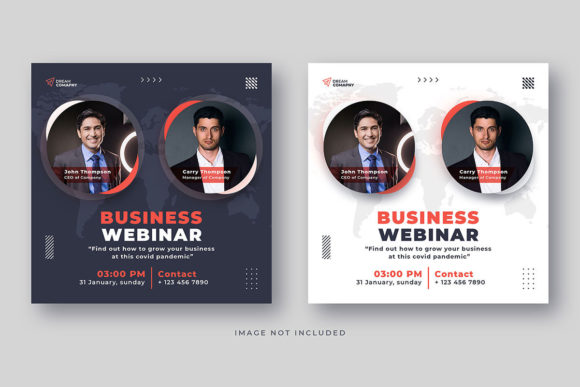
The "Business Webinar Social Media Post" template is specifically engineered to bridge that gap. It is not merely a static image; it is a fully editable design system tailored for the fast-paced world of Instagram and social media marketing. Unlike standard stock photos or rigid templates, this asset is built on a foundation of flexibility. It features two distinct Instagram post banners sized at the optimal 1080x1080 pixels, ensuring your visuals look crisp and professional on mobile feeds. Because it utilizes Smart Objects in Photoshop, swapping out the background image to match your specific webinar topic—whether it’s financial planning, creative coaching, or tech tutorials—is a seamless process. You aren't just buying a graphic; you are acquiring a production tool that allows you to maintain visual consistency across all your marketing channels.
Practical Applications Beyond the Feed
While the primary function of these files is social media graphics, their utility extends far beyond a single Instagram post. For the creative entrepreneur or brand strategist, maintaining a cohesive brand identity is paramount. The layered nature of these Photoshop files means you can easily extract elements to create a suite of marketing assets.
Consider the versatility required in modern branding. You might start with the Instagram post to announce the event, but you quickly need to adapt that design for:
- Website Integration: Embedding the graphic into a landing page or blog sidebar to capture leads.
- Email Marketing: Using a cropped version of the design for newsletter headers to maintain brand recognition.
- Digital Products: Incorporating the design language into the slides or workbooks provided during the webinar itself.
- Merchandise and Print: Adapting the high-resolution elements for physical handouts or even branded merchandise if the webinar is part of a larger live event.
The ability to change colors, fonts, and shapes means the template adapts to your style guide, not the other way around. This is crucial for anyone looking to build a premium font and visual identity that feels bespoke rather than off-the-rack.
Typography and Readability in Marketing
A key feature of a professional design asset is its attention to typography. The "Business Webinar Social Media Post" template utilizes free fonts, removing the barrier of expensive licensing fees while still delivering a modern typography aesthetic. When selecting a style for your webinar promotion, readability must be your north star. Social media users scroll quickly; your message needs to be digested in seconds.
This template encourages a hierarchy of information. The layered structure allows you to play with font pairings—perhaps a bold sans serif font for the headline to grab attention, paired with a clean, legible serif or sans serif font for the details. This contrast helps guide the viewer's eye from the "hook" of the webinar to the logistical details like date and time. For marketers and bloggers, this is a practical lesson in visual communication: clarity always trumps complexity. A well-chosen typeface does not just decorate; it informs.
Streamlining Your Workflow
For the busy small business owner or the freelance designer juggling multiple clients, time is a finite resource. One of the most significant advantages of using a layered, fully editable template is the efficiency it introduces to your workflow. Instead of starting from a blank canvas in Photoshop every time you need to promote a live event, you have a pre-structured foundation.
The 72 dpi resolution is optimized for digital viewing, ensuring fast load times on websites and social platforms without sacrificing visual quality on screens. The inclusion of Smart Objects means that even those with intermediate Photoshop skills can achieve a professional presentation. You simply double-click the layer, paste your image, and save. This allows you to focus your energy on the content of the webinar—refining your script, engaging with your community, and preparing your sales funnel—rather than getting bogged down in pixel-pushing.
Elevating Brand Recognition
Ultimately, the goal of any marketing asset is to foster trust and recognition. When your audience sees a consistent visual style across your Instagram posts, your website, and your digital products, they begin to recognize your brand identity instantly. This consistency signals professionalism and reliability. The "Business Webinar Social Media Post" template serves as a cornerstone for this visual strategy. By customizing it to fit your unique voice, you transform a generic promotional tool into a powerful extension of your brand, ensuring that your next digital marketing conference or online workshop makes a lasting impression long before the presentation begins.