Streamline Your Next Medical Presentation with This Template
There is a specific kind of anxiety that sets in when you realize you have to create a professional presentation from scratch, especially in the medical field. Whether you are a healthcare administrator pitching a new protocol to the board, a researcher presenting findings at a conference, or a pharmaceutical sales rep outlining a new product, the bar for visual quality is incredibly high. You aren't just sharing data; you are building trust. A cluttered, amateurish slide deck can instantly undermine your credibility, no matter how sound your science is. This is precisely why having a robust, ready-to-go framework like the Medical Google Slide Template isn't just a luxury—it’s a necessity for anyone serious about effective communication in the healthcare sector.
The Anatomy of a Professional Medical Deck
What separates a mediocre presentation from one that commands attention? It usually comes down to consistency and organization. With over 150 total slides included in this package, you aren't just getting a blank canvas; you are getting a comprehensive visual system. The sheer volume of content ensures that you will never run out of layouts, regardless of how complex your data might be. The package includes 5 premade color variations, with 30 distinct slides dedicated to each template. This structure allows you to choose a color scheme that aligns with your organization’s branding or the specific mood of your topic—perhaps a calming blue for a patient wellness initiative or a high-energy green for a biotech innovation pitch.
One of the standout features here is the "Pixel-perfect illustrations." In the medical world, generic clip art doesn't cut it. You need imagery that feels accurate and professional. These handcrafted infographics are designed to convey complex medical concepts clearly. Whether you are explaining a biological process or showing statistical outcomes, the visual hierarchy is already built for you. Furthermore, the inclusion of Section Break Slides helps your audience mentally "reset" between topics, which is crucial when you are dense information like clinical trial results or operational workflows.
Design Assets That Save You Hours
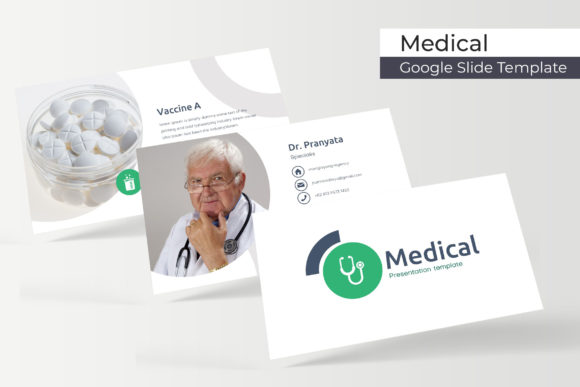
If you have ever tried to resize an image in a presentation software only to have it distort or pixelate, you will appreciate the "Resizable and Editable Graphic Picture Placeholder" feature. This template is built on Master Slides, which is the technical backbone that ensures every element remains crisp and scalable. You don't need to be a graphic designer to make this look good. The drag-and-drop functionality means that if you have a high-resolution photo of your medical team or a specific piece of equipment, you can swap it in instantly without ruining the layout.
This level of flexibility is a game-changer for small business owners and marketing professionals. Think about the last time you updated your website or social media graphics; consistency was likely your biggest hurdle. By using a template based on Master Slides, you ensure that your typography, spacing, and element placement remain uniform across all 150+ slides. This visual consistency is the bedrock of brand recognition. When your slides look polished, your audience focuses on your message rather than being distracted by misaligned text boxes or low-quality images.
Practical Applications Beyond the Boardroom
While the name suggests a focus on medical presentations, the versatility of this asset extends much further. The clean, structured nature of medical design—lots of white space, clear typography, and data visualization—makes it an excellent choice for a variety of sectors.
For content creators and bloggers, these slides can be repurposed into high-value digital products. Imagine taking the data visualization slides and turning them into educational Instagram carousels or Pinterest infographics. The "Handcrafted Infographic" elements are particularly useful here, as they can be extracted and used as standalone graphics for social media, driving engagement without requiring you to build charts from scratch.
Entrepreneurs and startups in the health and wellness space can leverage the "Gallery and Portfolio slide" features. If you are launching a new line of supplements or a fitness app, you need a place to showcase your product mockups. The picture placeholders are designed to frame your assets professionally, making your product look established and ready for market. This is vital for packaging design presentations or investor decks where visual appeal directly influences funding decisions.
Integrating Typography and Visual Identity
A presentation template is only as good as its typography. A common struggle in design is finding a font that is legible on a screen but also carries the right personality. This package takes the guesswork out of the equation by including a "Readme First" document with a link to download the specific free font used in the design. This is a critical detail that many template providers overlook. Using the intended font ensures that the spacing and kerning (the distance between letters) remain exactly as the designer intended, preserving the "Pixel-perfect" quality of the layout.
However, you also have the freedom to adapt. If your brand identity already utilizes a specific sans serif font for modern readability or a serif font for a more traditional, authoritative feel, the Master Slides make it easy to update the global text styles. When choosing your typography for a medical or professional context, prioritize readability. A premium font with high x-heights and clear letterforms will always outperform a stylized script font when you are presenting dense data. Use the template’s structure to test your font pairings—perhaps a bold sans serif for headers and a lighter weight for body text—to guide the viewer's eye through your narrative.
Technical Specifications and Usage Tips
It is important to note the logistics of what you are getting. The package includes 5 PPTX files formatted for widescreen (16:9), which is the standard for modern projectors and monitors. Because the files are PPTX, they are fully compatible with both Microsoft PowerPoint and Google Slides, giving you the flexibility to work offline or collaborate in the cloud.
A crucial tip for users: always pay attention to the licensing of the assets you use. While the template itself provides the framework, the "photographs or pictures used in the preview are not included." This is standard practice in the design world. You will need to source your own high-quality stock photos or use your own photography. This actually works in your favor, as it allows you to inject your unique branding into the slides rather than using the same generic stock images that everyone else might use.
For those working on marketing assets or editorial layouts, consider the Section Break Slides as opportunities for storytelling. Instead of just a title, use these moments to pose a question to your audience or highlight a key takeaway. Because the graphics are resizable, you can scale up a key chart to fill the entire screen for maximum impact during a critical moment in your pitch. Whether you are preparing a keynote speech, a quarterly business review, or a workshop for students, having a versatile, professionally designed Medical Google Slide Template allows you to focus on what matters most: delivering your message with clarity and confidence.