Mencost PowerPoint Template: A Deep Dive into Presentation Design
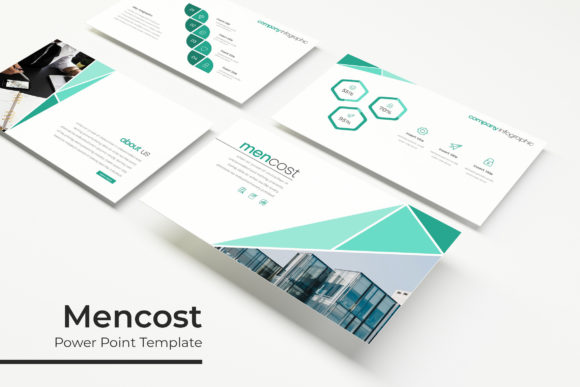
There's a specific moment of frustration familiar to anyone who has had to build a presentation from scratch. It’s the point where you realize you’re spending more time wrestling with inconsistent formatting, mismatched colors, and awkward layouts than you are on the actual message you need to deliver. The goal is to look professional, to have your ideas understood clearly, and to hold your audience's attention, but the tools can often get in the way. This is where a thoughtfully constructed design system, like the Mencost PowerPoint Template, shifts from being a simple download to a genuine productivity asset. It’s not just a collection of pre-made slides; it’s a framework built for clarity and visual impact.
Building a Cohesive Visual Story
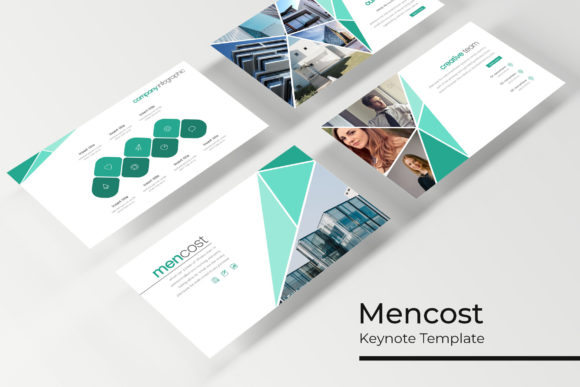
The core of any effective presentation is consistency. When your audience sees a unified color scheme, a consistent typographic hierarchy, and a logical flow from one slide to the next, they can focus on your content. The Mencost PowerPoint Template is built around this principle. With 150+ total slides structured across 5 premade color palettes, it provides a complete visual ecosystem. Each of the 5 color variations offers 30 distinct slides, meaning you’re not just getting one template—you’re getting five cohesive design directions right out of the box. This is incredibly useful for branding. Whether you’re presenting a quarterly business review, pitching a new product, or teaching a workshop, you can select the color scheme that best aligns with your brand’s mood and personality, ensuring every presentation feels authentically yours.
Beyond color, the architecture of the slides is where the real value lies for a busy entrepreneur or marketer. The inclusion of dedicated Section Break Slides is a subtle but powerful feature. They act as visual punctuation, helping your audience mentally segment the information and follow your narrative arc. Similarly, the Gallery and Portfolio slide templates are designed with Picture Placeholder functionality. This means you can simply drag and drop your own images into designated areas, and they will automatically conform to the intended layout, maintaining that pixel-perfect alignment. This eliminates the tedious process of manually resizing and cropping every image, saving you hours and preventing the sloppy look of mismatched visuals.
Practical Applications Beyond the Boardroom
While "PowerPoint Template" suggests a business context, the versatility of a resource like Mencost extends much further. For content creators and bloggers, these slides are a goldmine for repurposing content. A detailed blog post can be transformed into a visually engaging slide deck for SlideShare, LinkedIn, or Instagram Stories. The handcrafted infographics included are particularly valuable here. Instead of trying to explain a complex process or data set with paragraphs of text, you can use these pre-designed visual metaphors to communicate more effectively and memorably.
For those involved in packaging design or product launches, the template serves as an excellent mood board and pitch tool. You can use the slides to present your design concepts, color palettes, and typography choices to clients or stakeholders in a polished, professional manner. The resizable and editable graphics mean you can adapt any element to fit your specific needs. If an icon doesn’t quite work, you can change its color or size without breaking the design of the slide. This flexibility is crucial for creative professionals who need to tailor every presentation to a unique project.
Mastering the Details for Maximum Impact
The technical foundation of the Mencost template is what makes it robust and user-friendly. Being based on Master Slides means that global changes—like updating a logo or changing a primary color—can be made in one place and will automatically update across the entire presentation. This is a non-negotiable feature for anyone serious about maintaining brand identity across multiple documents. It ensures visual consistency without the manual labor.
The promise of pixel-perfect illustrations speaks to a level of care in the design assets. In a world saturated with generic clip art, having custom, high-quality illustrations elevates the perceived value of your entire presentation. It signals attention to detail and a commitment to quality, which subconsciously builds trust with your audience. This is where the template transitions from a utility to a premium design asset. It helps improve professional presentation and, by extension, audience engagement. People are more likely to stay tuned to a presentation that is visually appealing and easy to follow.
Integrating Mencost Into Your Design Workflow
Getting started with the Mencost PowerPoint Template is straightforward, but a few practical tips can help you get the most out of it. First, upon opening the included Readme First file, take note of the font used. The package includes a free font download link, so ensure you install it before you begin editing. This guarantees that the text will render exactly as the designer intended, preserving the intended typography and readability.
Next, think about your content strategy. Don’t just dump information onto slides. Use the template’s structure to guide your storytelling. The section break slides are your chapter markers. The infographic slides are your visual explanations. The portfolio slides are your proof of concept. By aligning your content with the template’s purpose-built layouts, you create a more logical and persuasive flow.
Finally, remember that the 5 PPTX Files and 5 PPTX Widescreen files are your playground. Experiment with the different color themes to see which resonates most with your project’s goals. Mix and match slides from different color variations if you’re feeling adventurous, but always test for visual harmony. The goal is to use the template as a starting point, a foundation of good design upon which you build your unique message. In the end, a tool like Mencost is about removing barriers. It handles the heavy lifting of layout, consistency, and aesthetic appeal, freeing you to focus on what truly matters: connecting with your audience and communicating your ideas with clarity and confidence.