Streamline Your Brand's Visuals with the New Business Pinterest Template
Scrolling through Pinterest, you’ve likely seen them: the brands that just get it. Their pins are cohesive, their message is clear, and their visual identity feels instantly recognizable. That polished, professional look isn’t an accident—it’s the result of a deliberate design strategy. For many entrepreneurs and creators, the gap between a brilliant idea and a visually consistent brand presence on social media feels wide. This is where having the right design assets becomes less of a luxury and more of a practical necessity. A well-structured template can be the bridge, providing a foundation to build upon rather than starting from a blank canvas every time.
A Closer Look at the Template's Design Philosophy
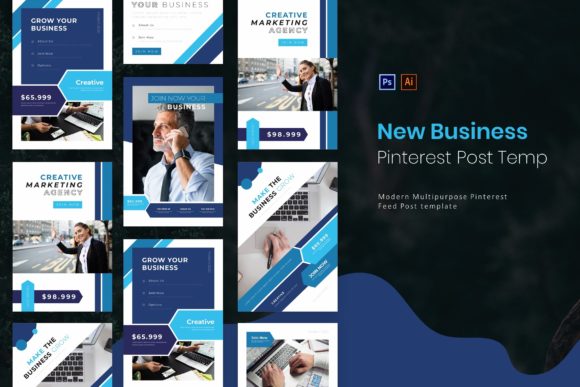
The New Business | Pinterest Post Template is built on a principle of elegant minimalism. Its modern aesthetic avoids visual clutter, allowing your core message, product, or service to take center stage. This isn't about flashy trends that fade; it's about creating a timeless visual framework. The design uses clean lines, ample white space, and a structured layout to guide the viewer's eye exactly where you want it to go. This approach is incredibly versatile, working seamlessly for a freelance graphic designer showcasing a portfolio, a boutique owner announcing a new product line, or a blogger promoting a recent article. The simplicity is its strength, providing a professional canvas that adapts to your unique brand voice.
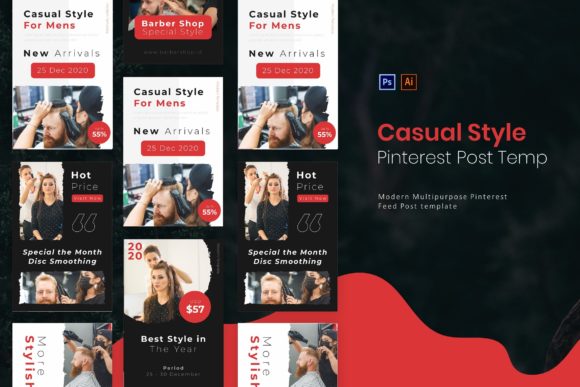
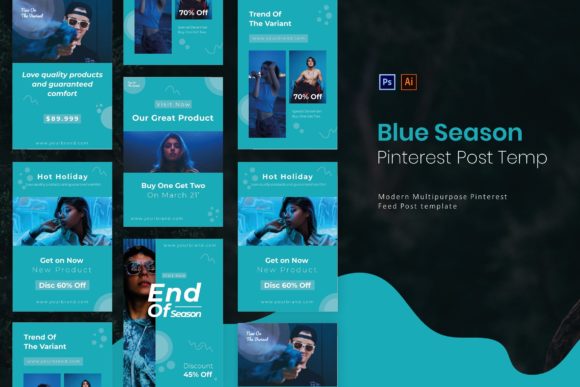
Practically speaking, this template package includes five distinct page layouts, each crafted for different content needs. You might use one pin for a bold product shot with a simple text overlay, another for a step-by-step tutorial with multiple image slots, and a third for sharing a powerful customer testimonial. The files are provided in both AI and PSD formats, ensuring compatibility whether your workflow is built around Adobe Illustrator or Photoshop. With a perfectly optimized pin size of 735 x 1102 pixels, you can be confident your graphics will display crisply and attractively in the Pinterest feed. Every element is fully layered and organized, meaning you can dive in and customize colors, text, and shapes without wrestling with a tangled mess of design elements.
From Template to Brand Identity: Practical Applications
Think of this template not as a one-off pin creator, but as a cornerstone of your broader brand identity system. The visual consistency it offers is a powerful tool for brand recognition. When a follower sees your pin in their feed, the consistent color palette, font choice, and layout structure act as immediate visual cues, signaling that it’s content from you. This repetition builds familiarity and trust over time. You can extend this aesthetic beyond Pinterest, using the same design principles for Instagram Stories, Facebook graphics, or even the hero images on your blog, creating a seamless experience for your audience across every touchpoint.
The real-world applications are vast. For packaging design or print materials, the clean layouts can inspire the look of thank-you cards, product tags, or informational inserts. As a marketing asset, these pins are perfect for promoting webinars, e-books, or online courses with a cohesive visual theme. Content creators and bloggers can use them to design pins that drive traffic to specific posts, using a mix of image-heavy and text-focused layouts to keep their profile visually engaging. Even for digital products, like selling Canva templates or Lightroom presets, these pins can showcase your offerings in a professional, trustworthy manner that encourages clicks and conversions.
Maximizing Impact with Smart Customization
Having a template is the first step; customizing it effectively is where the magic happens. A key piece of advice is to treat the included layouts as a starting point for your own design system. Start by swapping the placeholder text and images with your own high-quality visuals and authentic brand messaging. Then, dive into the colors and shapes. Update the color palette to match your existing brand guidelines—this single change will make the template feel entirely yours. If your brand uses a specific geometric shape or icon, consider how you might subtly incorporate it into the design.
Typography is another critical area for customization. While the template uses a free font, you should consider pairing it with your own brand fonts for ultimate consistency. A good practice is to use the template's font for secondary text or calls-to-action, and your primary brand font for headlines. Always prioritize readability; ensure there is sufficient contrast between text and background, and that the font size is legible on a mobile device. Before finalizing a design, view it at a smaller size to mimic how it will appear on a phone screen. This simple test can save you from creating beautiful pins that are ultimately ineffective because their message gets lost.
Ensuring a Professional and Cohesive Social Media Presence
Ultimately, the goal is to present a professional image that resonates with your target audience. The New Business | Pinterest Post Template is designed to help you achieve that without requiring advanced design skills or a significant time investment. By providing a structured, elegant framework, it allows you to focus on what truly matters: your message and your audience. The organized file structure means you spend less time searching for layers and more time creating. This efficiency is invaluable for busy small business owners and entrepreneurs who need to maintain an active, polished social media presence.
Remember, the most effective social media graphics are those that feel authentic to the brand they represent. Use this template as a tool to amplify your voice, not replace it. Experiment with the five different layouts to see which formats your audience engages with most. Test different combinations of imagery and copy. The consistent foundation provided by the template will ensure that even as you experiment, your overall brand aesthetic remains strong and recognizable. In a crowded digital landscape, that visual consistency is what helps you cut through the noise and build a lasting connection with your community.