Macana: The Keynote Template for Stunning, Cohesive Presentations
Let's be honest: building a presentation from scratch is a pain. You start with a blank slide, wrestle with alignment, hunt for icons that don't look like clip art, and spend hours trying to make your charts look remotely professional. The result? You burn through time you don't have, and the final deck often feels disjointed—a mishmash of borrowed styles rather than a clear, compelling visual story. For anyone who presents regularly, from entrepreneurs pitching investors to designers showcasing a portfolio, this friction is a real productivity killer and a brand consistency nightmare.
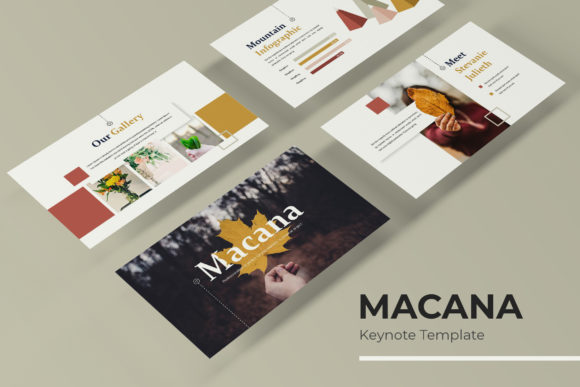
This is where a thoughtfully crafted template system changes the game. The Macana Keynote Template isn't just a collection of pretty slides; it's a designed framework meant to solve the core problems of presentation creation. It provides the structural foundation so you can focus entirely on your message. Imagine having 150+ total slides at your disposal, not as a chaotic library, but as an organized system. These slides are grouped into five distinct premade color themes, with 30 slides meticulously designed for each palette. This means you can choose a color scheme that aligns with your brand identity from the start, ensuring every single slide you use feels intentionally part of the same visual family. The result is immediate visual consistency—the bedrock of professional communication and brand recognition.
Beyond Aesthetics: The Engine of an Effective Deck
The true value of a premium design asset like this lies in its functional components. The Macana template includes handcrafted infographics that transform complex data into clear, engaging visual narratives. Instead of pasting a dense spreadsheet onto a slide, you can present growth metrics, process flows, or comparative analyses in a way that your audience actually understands and remembers. These aren't generic shapes; they're designed to be both informative and aesthetically aligned with the overall template style.
Furthermore, the inclusion of dedicated section break slides is a subtle but powerful feature. They provide a natural pause in your presentation, allowing you to segment your talk logically—whether you're moving from "Problem" to "Solution" or from "Our Process" to "Case Studies." Paired with gallery and portfolio slides, you have ready-made frames to showcase your work, products, or team in a polished, grid-based layout. This is invaluable for creative professionals, agencies, and product-based businesses that need to let their visual work speak for itself.
Designed for the Real World: Flexibility and Ease of Use
A template is only useful if it's easy to adapt. The Macana system is built on master slides, which is the professional standard for Keynote. This means when you edit a master slide—changing a font, adjusting a color, or modifying a layout—that change cascades through all the slides based on it. This one-time adjustment saves you from the tedious task of editing dozens of slides individually. The graphics are also fully resizable and editable, and picture placeholders operate on a simple drag-and-drop principle. You can drop your own images into pre-formatted frames without worrying about cropping or distortion, maintaining that pixel-perfect quality the template was built with.
This flexibility extends to its practical applications. Think about how this template could streamline your workflow across different projects:
- Brand Presentations & Pitches: Use the gallery slides for your portfolio, the infographic slides to outline your service process, and the consistent color themes to reinforce your brand at every turn.
- Marketing & Social Media: Create a series of on-brand social media graphics or webinar slides that all look like they belong together, strengthening your visual identity across platforms.
- Internal Reports & Training: Transform dry quarterly reports or training manuals into engaging, easy-to-follow presentations that keep your team's attention.
- Product Launches & Packaging Design Decks: Present your new product line or packaging concepts with a professional flair that impresses stakeholders and partners.
The included readme file and free font download link are practical touches that show an understanding of the user's needs. You're not left guessing about typefaces or scrambling to find matching fonts. It's a complete kit: five KEY files in widescreen format, each with its own color theme, plus the resources to get started immediately.
Making the Template Your Own: Practical Considerations
When you download a template like Macana, your first step should be to explore its structure. Open the master slide view to understand the design system. Identify the slide masters for titles, content, two-column layouts, and section breaks. This is where you'll make your foundational edits. If your brand uses a specific sans serif font for headings and a clean serif for body text, swap them in at the master level. Adjust the color palette to match your brand's hex codes. This initial setup, which might take 20-30 minutes, will save you hours down the line.
Next, consider your content strategy. Don't just use slides randomly. Plan your narrative arc. Use the section break slides as chapter markers in your story. The portfolio slides aren't just for designers; a coach could use them to display client testimonials, a baker could showcase cake designs, or a consultant could highlight key projects. The infographic slides are perfect for explaining your unique value proposition, your company's history timeline, or the results you've achieved for clients.
Remember, the photographs used in the preview are for illustration only—you will supply your own imagery. This is actually a benefit. It forces you to use your own authentic photos, screenshots, or product images, which will make the presentation genuinely yours and far more credible to your audience. The template provides the professional framework; you provide the authentic content.
In a world where attention spans are short and visual communication is paramount, having a robust, flexible, and beautifully designed presentation system is no longer a luxury—it's a necessity for clear, effective communication. It elevates your professional image, ensures brand consistency, and most importantly, lets you focus on what you do best: sharing your ideas, your work, and your story with confidence.