Cibo Keynote Template: A Visual Toolkit for Your Next Big Pitch
You've got the idea. The data is solid, the strategy is sound, and the narrative is compelling. But when you open your presentation software, that blank, white canvas stares back, a reminder that great ideas deserve a stage, not just a slide. This is where the Cibo Keynote Template comes in—not as a mere set of slides, but as a cohesive visual system designed to translate your vision into a polished, persuasive story. It’s built for the entrepreneur crafting a pitch deck, the marketer rolling out a new campaign, or the designer presenting a brand overhaul, offering a foundation that feels both professional and creatively liberating.
A System Built for Visual Storytelling
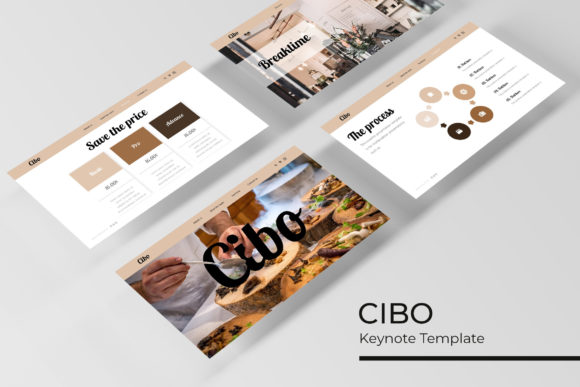
At its core, Cibo is a presentation toolkit that understands the need for both consistency and variety. The package includes 150+ total slides, meticulously organized across five premade color themes. This isn't just about changing a background hue; each of the five color variations contains 30 thoughtfully designed slides, ensuring your visual language remains consistent from the first "hello" to the final call to action. This structure eliminates the guesswork of matching charts to diagrams to image layouts, allowing you to focus on the narrative flow. The handcrafted infographics, for instance, are designed to make complex data digestible at a glance, turning statistics into visual talking points rather than confusing clutter.
Beyond data visualization, the template includes dedicated section break slides and a gallery/portfolio section. The section breaks provide a mental pause for your audience, clearly demarcating chapters in your presentation. The portfolio slides are a godsend for creative professionals—designers, photographers, or agencies—offering a sleek way to showcase work without spending hours aligning images and text boxes. Every element is built upon master slides, a feature that ensures pixel-perfect illustrations and graphics stay sharp on any screen, from a laptop to a 4K projector.
Practical Applications: From Boardroom to Social Feed
The true value of a design asset like the Cibo Keynote Template lies in its adaptability. Think beyond the traditional boardroom presentation. These slides are a treasure trove for building a cohesive brand identity system. The clean, modern typography and structured layouts can be directly adapted into the basis for a brand style guide. The consistent color palettes and graphic styles help reinforce brand recognition across all touchpoints.
For small business owners and content creators, the template is a powerhouse for marketing assets. The resizable and editable graphics, combined with the simple drag & drop picture placeholder functionality, mean you can quickly generate:
- Social Media Graphics: Use individual slide designs as templates for Instagram carousels, Facebook ads, or LinkedIn post visuals. A well-designed infographic slide can be repurposed into a series of engaging social posts.
- Digital Products: Structure an e-book, webinar deck, or online course module with professional polish. The pre-designed layouts save immense time in formatting.
- Client Reports & Proposals: Move beyond Word docs. A visually engaging proposal built with Cibo’s slides communicates professionalism and attention to detail, helping you win business.
- Pitch Decks: The structured flow is ideal for investor or client pitches, where clarity and visual impact are paramount.
Even for print materials, the high-quality design translates well. Export slides as PDFs to create sleek brochures, one-page flyers, or even the layout for a simple poster. The key is viewing each slide not as a final product, but as a modular component in your larger design toolkit.
Choosing Your Tools: Fonts, Pairings, and Licensing
A presentation template is only as good as its typography. Cibo uses a free font, and the included "Readme First" file is your essential guide. Always start there. It will specify the exact font used and provide the download link. This is a crucial step—using the specified font ensures the layout, spacing, and alignment you see in the preview remain intact.
When working with any premium font or template, consider these practical steps:
- Test Your Pairings: While the template provides a primary font, you may need a secondary one for body text or captions. Use a tool like FontPair or Google Fonts to find a complementary sans-serif or serif that maintains readability and doesn’t clash stylistically.
- Prioritize Readability: A beautiful display font means nothing if your audience can’t read it at a glance. Ensure body text is a comfortable size (typically 24pt or larger for presentations) and has sufficient contrast against the background.
- Understand the License: The fonts included are free, but it’s your responsibility to verify the license permits your intended use—especially for commercial projects like client work, merchandise, or digital products for sale. Most free fonts allow this, but a quick check of the license file is a professional best practice.
- Leverage the Master Slides: This is the engine room of the template. Edits made to a master slide automatically update every slide based on it. Need to change the color accent or adjust the font size globally? Do it once in the master, and watch the consistency propagate throughout your entire deck. This is how you achieve that professional, unified look efficiently.
Maximizing Your Investment
Getting the most from a toolkit like Cibo means thinking in systems. Start by selecting the color theme that best aligns with your brand or project’s mood. Then, don’t feel constrained to use the slides in the order they appear. Mix and match. Pull the clean, text-focused slide for your agenda, use the dynamic infographic for your market analysis, and deploy the bold portfolio grid for your case study. The drag & drop image placeholders are particularly useful here, allowing you to quickly insert your own visuals without wrestling with formatting.
Remember, the preview images are for illustration—they show what’s possible. Your final product will be uniquely yours, filled with your content, your images, and your brand’s voice. The template provides the professional skeleton; you provide the soul. By focusing on clear communication and leveraging the consistent visual framework, you create presentations that don’t just share information, but build understanding and drive action. It’s about giving your ideas the polished, credible platform they deserve.