Cuisine: A Fresh Visual Recipe for Your Next Presentation
Let's be honest: we've all sat through a presentation that felt like it was assembled in a rush, with clashing colors, inconsistent fonts, and a layout that made us want to check our phones. Creating a visually cohesive and professional slide deck is a massive time sink, especially when you're trying to focus on the content itself. This is where a thoughtfully designed template like the Cuisine Power Point Template enters the picture. It’s not just a collection of slides; it's a complete visual system designed to help you tell a compelling story, whether you're pitching a new menu, outlining a marketing strategy, or presenting a business plan.
A Complete Visual Toolkit, Not Just a Slide Deck
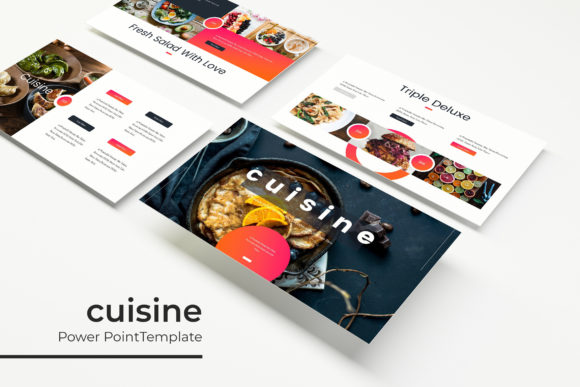
What immediately stands out about this package is its sheer comprehensiveness. With over 150 total slides, it’s built to handle almost any presentation scenario you can imagine. The real genius, however, lies in its structure. You get five distinct premade color palettes, each containing 30 meticulously crafted slides. This means you can choose a color scheme that aligns perfectly with your brand identity or the specific mood of your talk—be it earthy and organic for a farm-to-table concept or sleek and modern for a tech startup.
Every element is built on master slides, ensuring pixel-perfect consistency across your entire presentation. This foundational approach is a lifesaver for maintaining a professional look. Instead of manually adjusting every title box or image placeholder, you make a change once on the master, and it updates everywhere. The drag-and-drop picture placeholders are another practical feature that streamlines your workflow. Simply drag your own images into the designated areas, and they snap perfectly into place, respecting the design's composition without any extra cropping or resizing hassle.
The inclusion of handcrafted infographics is a standout feature for anyone needing to present data. Forget generic, overused chart styles. These infographics are designed to be both beautiful and functional, allowing you to visualize statistics, processes, or timelines in a way that engages your audience rather than confusing them. Paired with dedicated section break slides, you can guide your viewers through your narrative with clear, visual punctuation.
From Restaurant Pitches to Corporate Reports: Real-World Uses
The versatility of a template like this is its greatest strength. Think beyond the obvious restaurant pitch. A small business owner could use it to create a polished investor deck, using the portfolio slides to showcase products and the infographic slides to explain market growth. A marketing manager could build a quarterly review presentation that feels dynamic and data-driven. Even a blogger or content creator could adapt it for a webinar or an online course, using the clean layouts to present educational material in a digestible format.
The design assets included—like the gallery and portfolio slides—are perfect for visual storytelling. If you're a photographer, architect, or designer, these slides provide an elegant framework to let your work shine without the distraction of a poorly designed frame. The resizable and editable graphics mean you can scale charts, icons, and illustrations to fit your specific content needs without losing quality. This flexibility is crucial for adapting the template to your unique message.
Practical Tips for Making It Your Own
Starting with a powerful template is half the battle, but customization is where you make it truly yours. First, select your color scheme. Look at your existing brand guidelines. Which of the five premade palettes complements your logo and brand colors most effectively? Sometimes, the best choice isn't the most obvious one; it might be a palette that provides a sophisticated contrast.
Next, consider your typography. While the template uses a free, widely available font (with the download link included), you may want to pair it with your brand's primary typeface for consistency. A good rule of thumb is to use no more than two or three fonts in a single presentation: one for headings, one for body text, and perhaps a third for accents. Ensure the font you choose for body text is highly readable at a distance—avoid overly decorative scripts for paragraphs of information.
When populating your slides, resist the urge to fill every square inch with text. Use the generous white space intentionally. Let key points breathe. Use the pre-designed infographics to break down complex information into visual chunks. If a slide feels crowded, it likely means you have too much content for one idea; consider splitting it across two slides. The goal is clarity and impact, not information overload.
Designed for the Modern Professional
This isn't a template you'll use once and forget. Its clean, modern design aesthetic ensures it won't look dated in six months. The emphasis on pixel-perfect illustrations and clean lines aligns with current design trends that favor minimalism and functionality. For entrepreneurs and freelancers, this means you have a reliable, go-to asset for client pitches, sales decks, and project proposals that consistently project professionalism.
For those in the food and beverage industry, the thematic connection is a bonus, but its application is far broader. The "Cuisine" aspect speaks to a crafted, curated approach to design—something that feels prepared with care and attention to detail. It’s about presenting your ideas with the same precision a chef brings to a dish.
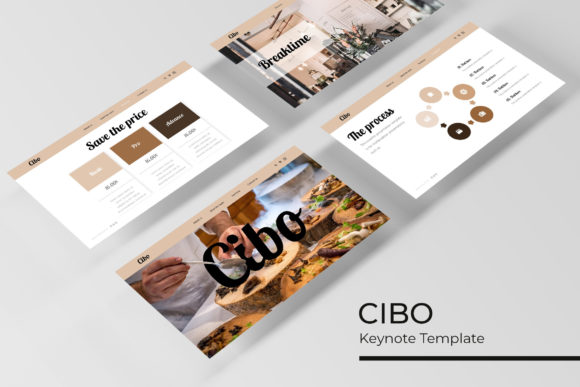
Remember, the preview images are for illustration only; the actual product is the slide master file system. You're investing in the structure, the layout logic, and the design components that will save you dozens of hours. It’s a foundational tool that empowers you to focus on your content and delivery, confident that the visual framework supporting you is solid, professional, and adaptable to your creative vision.