Cromo Keynote Template: Design Presentations That Captivate
You know that feeling when you open a blank presentation file and the cursor just blinks back at you? For designers, entrepreneurs, and marketers, the hardest part of building a pitch deck or a brand strategy isn't usually the content—it's the layout. We often spend hours trying to align text boxes, match color palettes, and create infographics from scratch, time that could be spent refining the actual message. This is where a robust design asset comes into play. If you are looking to streamline your workflow and deliver a high-end visual experience without the headache of starting from zero, the Cromo Keynote Template might be the missing piece in your creative toolkit.
A Deep Dive into the 150+ Slide Architecture
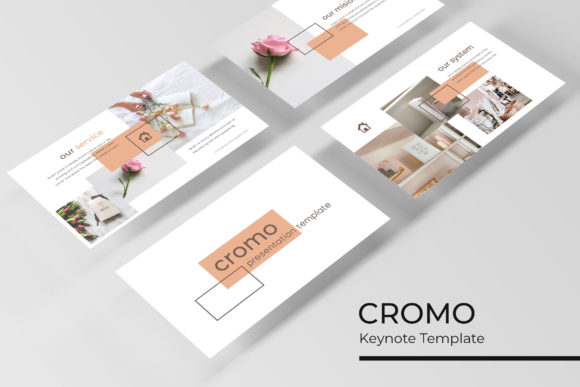
When we talk about modern typography and design assets, we are really talking about versatility. You don't want a template that looks great for one specific pitch and then fails you when the project scope changes. The strength of the Cromo Keynote Template lies in its sheer volume and structure. We are looking at over 150 total slides, but it isn't just about quantity; it's about organization. The package is built on five premade color themes, with 30 distinct slides dedicated to each variation. This ensures that whether you are pitching a dark-mode tech startup or a bright, airy lifestyle brand, you have a cohesive color story ready to go.
The foundation of this template relies on Master Slides. For anyone involved in logo design or brand identity management, this is a critical feature. It means that when you need to adjust a font style or shift a color tone, you aren't hunting through 50 individual pages to make the change. You update the master, and the entire deck follows suit. This pixel-perfect approach guarantees that your visual consistency remains intact from the first slide to the last, which is essential for building brand recognition.
Infographics and Visual Storytelling
Data is only as good as your ability to communicate it. We have all sat through presentations where the speaker throws up a dense spreadsheet, and the audience immediately checks their phones. The Cromo Keynote Template solves this with handcrafted infographics. These aren't generic clip-art charts; they are designed to translate complex information into digestible, engaging visuals.
Imagine you are a marketing professional presenting quarterly results to a client. Instead of raw numbers, you can utilize these editable graphics to show growth trajectories, market share, or workflow processes. The ability to resize and edit these graphics means they can fit into editorial layouts or digital products seamlessly. Whether you are creating social media graphics summarizing your presentation or embedding these charts into a web design case study, the flexibility is there. The inclusion of section break slides also helps in pacing your presentation, giving your audience a mental breather while maintaining the professional aesthetic.
Practical Applications for Entrepreneurs and Creatives
Let’s get practical. How does this specific toolset translate into real-world value for a small business owner or a creative agency? The answer lies in the "drag and drop" functionality and the picture placeholders. In the fast-paced world of packaging design or poster creation, efficiency is currency.
If you are a crafter or a hobbyist looking to sell your goods, you might need to create a lookbook or a portfolio. The Gallery and Portfolio slides included in the package are built specifically for this. You don't need to be a Keynote wizard to make your products look professional. By simply dragging your high-res images into the placeholders, you create a polished visual communication tool that can be used for invitations, merchandise catalogs, or investor decks.
Furthermore, the template includes widescreen formats (16:9), which is the standard for modern displays. This ensures your creative font choices and imagery aren't cut off or letterboxed when projected on a screen. It’s these small details that separate amateur presentations from those that command attention in a boardroom.
Optimizing Your Workflow and Assets
One of the most common frustrations in design is receiving a beautiful template only to find out that the fonts are paid, proprietary, or difficult to install. The Cromo Keynote Template addresses this by utilizing free fonts. The package includes a "Readme First" file and direct download links for the typefaces used. This is a massive time-saver and prevents the "missing font" error that can ruin a layout.
When working with premium font assets, you always need to consider the licensing. Because this template uses open-source or free-for-commercial-use typefaces, you have the freedom to use the final output for commercial projects without legal headaches. Whether you are designing a pitch for a blog, a website mockup, or a full brand identity guide, the typography is ready to go.
It is also worth noting the importance of font pairing. The designers behind Cromo have already done the heavy lifting of matching headings with body text to ensure readability. However, because the files are based on Master Slides, you can easily swap these out if you have a specific serif font or sans serif font that aligns with your existing brand guidelines. The structure is rigid enough to look professional, but flexible enough to be personalized.
Beyond the Slides: A Versatile Design System
Think of the Cromo Keynote Template not just as a presentation file, but as a library of design elements. The handcrafted infographics, the section breaks, and the portfolio layouts can be repurposed. You can export slides as PDFs to create instant print materials or take screenshots of specific charts to use in your blog posts.
For content creators, this is a goldmine. You can quickly mock up a digital product cover or create visual aids for a YouTube video without opening Photoshop or Illustrator. The pixel-perfect illustrations ensure that even if you zoom in or crop a section, the quality remains high.
Ultimately, the goal of any design asset is to remove friction from the creative process. By providing a structured, visually appealing, and highly editable environment, this template allows you to focus on what you do best—whether that's selling a product, teaching a concept, or presenting a strategy. It bridges the gap between a raw idea and a polished, professional presentation that resonates with your audience.
The included files are organized clearly: 5 KEY files for standard displays and 5 KEY Widescreen files for the modern aspect ratio. This dual-format approach ensures you are prepared for any scenario, from a laptop screen share to a large conference projector. When you combine this technical reliability with the modern typography and the five color variations, you get a tool that adapts to your needs rather than forcing you to adapt to it.
So, the next time you are staring at that blank slide deck, remember that you don't have to reinvent the wheel. With the right template, you can start with a foundation that looks like it was custom-built by a professional agency, saving your energy for the creative work that truly matters.