Streamline Your Brand: The Versatility of the Environ Power Point Template
There is a specific kind of frustration that sets in at 11:00 PM the night before a major pitch. You have the data, you have the strategy, but your slides look like they were cobbled together from a default 1998 software library. The text is misaligned, the colors clash, and the "stock photo" placeholder looks painfully generic. Whether you are a small business owner trying to secure funding, a marketer presenting quarterly results, or a creative agency pitching a new client, the visual quality of your presentation is often the silent judge of your professionalism. This is where the gap between a good idea and a great presentation usually lies. It is rarely about the content itself, but rather how that content is structured and displayed.
The Power of Structured Visuals
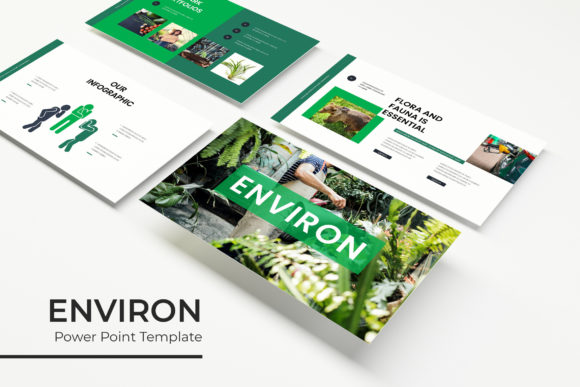
The Environ Power Point Template is designed to bridge that gap between raw data and polished delivery. At first glance, it offers a clean, modern aesthetic, but the real value lies in the architecture of the files. With over 150 total slides spread across five premade color variations, this asset is less of a simple template and more of a comprehensive presentation system. For the entrepreneur or designer, this means you aren't just buying a static layout; you are acquiring a toolkit that can adapt to different brand personalities. The five distinct color schemes ensure that whether your brand identity is bold and energetic or cool and corporate, there is a foundational visual language ready to support it.
One of the most critical aspects of modern design assets is flexibility. We have all experienced the "feature bloat" of complex software, where trying to move a simple text box results in a cascade of formatting errors. The Environ template addresses this by relying on Master Slides. For the uninitiated, Master Slides act as the blueprint for your presentation. By editing the master, you ensure global consistency. This is a massive time-saver for anyone managing a brand. If you update your logo or change your primary brand color, you don't have to manually click through 150 slides to fix it; you make the change once, and it ripples through the entire deck. This feature alone is a game-changer for maintaining visual consistency across different departments or marketing campaigns.
Practical Applications Beyond the Boardroom
While the primary function of a presentation template is clearly for slideshows, the utility of the Environ kit extends far beyond the projector screen. Because the graphics are pixel-perfect illustrations and the elements are fully resizable and editable, creative professionals can repurpose these assets for other marketing assets. Imagine you are a social media manager needing quick, branded content for Instagram or LinkedIn. You don't need to open a heavy program like Photoshop or Illustrator. You can simply open the PPTX file, isolate a specific handcrafted infographic, resize it, and export it as an image. This allows for rapid content creation that stays true to your brand guidelines.
Furthermore, the inclusion of Gallery and Portfolio slides makes this template highly valuable for photographers, interior designers, and visual artists. The picture placeholder feature utilizes a "drag & drop" interface. This means you don't need advanced technical skills to make your work look professional. You simply drag your high-resolution image into the designated area, and the template automatically crops and fits it to the design frame. This is particularly useful for creating lookbooks or digital catalogs. Instead of paying a web developer to build a temporary portfolio site, you can compile a sleek, interactive PDF or presentation deck that looks just as polished.
Designing for Engagement and Clarity
Visual communication is about guiding the viewer's eye. A cluttered slide with too much text creates cognitive load, causing your audience to disengage. The Environ template combats this through the use of Section Break Slides. These are strategic "pause points" in your narrative. When you are presenting a complex business model or a detailed project timeline, these breaks allow the audience to reset their focus. They signal a shift in topic, which helps with information retention. For educators and corporate trainers, this structural element is essential for keeping a classroom or meeting room engaged over long periods.
The typography choices included in the package also play a vital role in readability. While the preview images serve as illustration, the template is optimized for standard, readable fonts that ensure your message gets across without straining the eyes. Good modern typography isn't just about looking good; it's about hierarchy. The headers need to be distinct from the body text, and the call-to-action needs to stand out. By utilizing the pre-set text styles within the master slides, you ensure that your hierarchy remains consistent, which significantly improves the professional presentation of your ideas.
Maximizing Your Workflow
For the busy professional, efficiency is currency. The Environ template includes five PPTX files, specifically formatted for widescreen displays. This is crucial because the 16:9 aspect ratio is now the standard for monitors, laptops, and projectors. Using a standard 4:3 aspect ratio on modern hardware results in black bars on the side of the screen, which instantly cheapens the look of your presentation. By providing native widescreen files, the template ensures you are utilizing the full canvas of modern technology.
It is also worth noting the practical considerations regarding assets. The disclaimer that photographs used in previews are for illustration purposes only is a standard industry practice, but it highlights an important workflow tip: always use high-quality, licensed imagery. The "drag & drop" placeholders are designed to work best with high-resolution photos. If you insert a blurry, low-quality image into a pixel-perfect frame, the result will still look unprofessional. I recommend sourcing images from reputable stock sites or using your own photography to fill these frames. The quality of the container cannot save the quality of the content inside it.
Strategic Branding and Final Touches
Ultimately, a tool like the Environ Power Point Template serves as a force multiplier for your brand identity. It allows small teams to compete with the visual output of large agencies. By utilizing the handcrafted infographics, you can turn dry statistics into compelling visual stories. Data visualization is one of the hardest aspects of design to get right from scratch. Creating a custom bar chart or process diagram in standard software is tedious. Having a library of pre-designed, editable infographic elements allows you to drop in your numbers and have a presentation-ready graphic in minutes.
As you integrate this template into your workflow, remember to treat it as a living document. Customize the color palettes to match your specific hex codes. Swap out the placeholder text with your brand's specific voice and tone. The goal is not to look like you are using a template, but to look like you have a dedicated design team on staff. Whether you are preparing a keynote speech, a client onboarding deck, or a visual portfolio, having a robust, versatile, and visually cohesive system at your fingertips changes the way you approach communication. It removes the friction of design, allowing you to focus entirely on the message you need to deliver.