Unlocking Creative Insight: Your Keynote Template Blueprint
You’ve got the big idea. You know the strategy inside and out, the data is solid, and the potential impact is massive. But when it’s time to present, something falls flat. The slides look disjointed, the color palette feels random, and instead of your audience hanging on your every word, they’re squinting at a cluttered graph or trying to decipher a low-resolution image. For designers, entrepreneurs, and marketing professionals, this gap between a great idea and a mediocre presentation is a familiar, frustrating hurdle. It’s not about a lack of vision; it’s about the visual toolkit to bring that vision to life with the clarity and polish it deserves. This is precisely the problem the Creative Insight Keynote Template was built to solve, transforming your presentation from a simple slide deck into a compelling visual narrative.
A Visual System, Not Just a Slide Deck
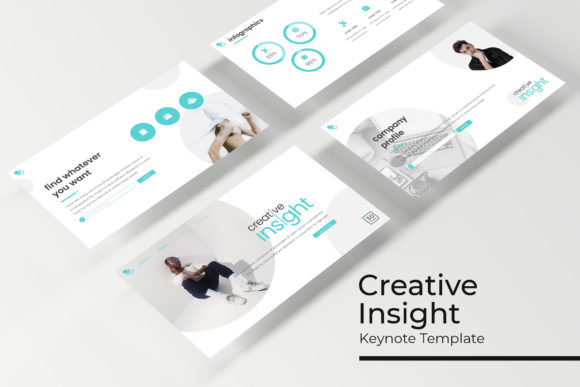
What separates a generic template from a truly effective presentation asset? Consistency and intentionality. The Creative Insight Keynote Template is designed as a comprehensive visual system. It arrives with 150+ total slides, strategically divided across five premade color themes. Each theme is a complete, cohesive package of 30 meticulously crafted slides, ensuring your presentation has a unified tone from the opening title to the final call to action. This isn't about being locked into a single look; it’s about having five distinct, professional starting points that guarantee visual harmony. Whether your brand is bold and energetic, sleek and minimalist, or warm and inviting, there’s a foundational color story ready for you.
The true power lies in the details. Forget about hunting for decent stock photos or wrestling with clunky chart tools. This template includes handcrafted infographics that turn complex data into clear, engaging stories. Dedicated section break slides provide natural pauses and help structure your talk, while the gallery and portfolio slides offer stunning, pre-formatted layouts to showcase your work, case studies, or product imagery. Every element is built on master slides, meaning you can make global changes to fonts or colors in one place and see them update across your entire deck instantly. It’s the difference between painting a room with a tiny brush and having a professional roller—efficiency and flawless results.
Beyond the Boardroom: Practical Applications for Every Creative
While "presentation" often conjures images of corporate meetings, the utility of a premium, versatile template like this extends far beyond quarterly reviews. For the small business owner, it’s the secret weapon for a polished investor pitch or a compelling product launch webinar. Content creators and bloggers can repurpose the slides into stunning social media carousels for Instagram or LinkedIn, turning a single piece of content into multiple engagement points. The resizeable and editable graphics with pixel-perfect illustrations ensure your visuals look sharp and professional across any platform, from a massive conference screen to a smartphone feed.
Think of it as a versatile design asset for your brand identity toolkit. The same visual language used in your Keynote can inform your:
- Marketing Assets: Create consistent sales sheets, one-pagers, and webinar decks that reinforce your brand.
- Digital Products: Design beautiful e-book layouts, online course modules, or client onboarding guides.
- Social Media Graphics: Extract individual slides or elements to create eye-catching posts, stories, and ad graphics with a unified look.
- Internal Communications: Present internal strategies, project updates, or training materials with a level of professionalism that boosts credibility and engagement.
The drag & drop picture placeholder functionality is a game-changer for efficiency. You don’t need to be a Keynote wizard to make it your own. Simply drag your own images into the designated spots, and the template automatically crops and fits them perfectly, maintaining the designer’s intended composition. This empowers you to focus on your message, not on pixel-pushing.
Crafting Your Message with Intentional Design
A beautiful template is a starting point, but its real value is unlocked when you align its design with your specific communication goals. The structure of your presentation matters as much as the words you say. Use the section break slides to signal a shift in topic, giving your audience a mental reset and keeping them oriented. Leverage the handcrafted infographics not just as decoration, but as tools to simplify a complex process, highlight key statistics, or compare options visually. A well-placed chart can do the explanatory work of ten bullet points.
When it comes to readability and audience engagement, the template’s foundation in modern typography is key. The included fonts are chosen for their clarity and style, but the system allows you to easily swap them for your own brand fonts. A crucial piece of practical advice: always test your font pairings within the template. A strong display font for headings paired with a highly readable sans serif font for body text is a classic, effective combination. Ensure your text has enough contrast against its background and that font sizes are large enough to be read comfortably from the back of a room.
Remember, every design choice should serve your objective. Are you trying to inspire action? Use bolder colors from one of the five themes and more dynamic slide transitions. Are you presenting detailed financials? Opt for a cleaner theme with ample white space and let the resizable graphics do the heavy lifting. The Creative Insight Keynote Template provides the professional framework; your job is to inject your unique content and strategic intent into it.
What You Get and How to Get Started
Clarity on deliverables is essential when investing in a design asset. The package is straightforward and comprehensive: you receive 5 KEY files (the standard Keynote format) and 5 KEY Widescreen files, each corresponding to one of the 5 premade color themes. This gives you flexibility depending on your presentation environment. A Readme First file is included to guide you through setup, and importantly, the font used is free, with download links provided, so there are no hidden costs or licensing headaches for the typography. A critical note, as with most templates, is that the photographs or pictures used in the preview are for illustration only and are not included; you will need to supply your own imagery, which the drag-and-drop placeholders make easy.
Before you dive in, take a moment to plan. Open each of the five color themes and see which one resonates most with your brand’s personality. Browse the slide types—do you need more portfolio slides for a creative pitch, or more infographic slides for a data-heavy report? This initial audit will save you time later. The template is built for commercial use, making it a sound investment for freelancers, agencies, and businesses alike. It’s more than a set of slides; it’s a premium design asset that elevates your visual communication, ensures brand consistency, and ultimately, helps your brilliant ideas get the presentation they deserve. Stop letting mediocre visuals undermine your message, and start presenting with the creative insight your work commands.