Critical Google Slides: A Template That Means Business
You've spent hours refining your pitch. The data is solid, the narrative is compelling, and you're ready to present your quarterly review to the leadership team. But when you open your presentation software, you're met with the same tired templates, clipart from 2005, and a color palette that feels utterly uninspired. The slide deck becomes a chore, not a tool. This is the exact problem the Critical Google Slide Template was designed to solve. It’s not just another set of slides; it’s a comprehensive visual system for professionals who understand that how you present information is just as important as the information itself.
A Visual System Built for Clarity and Impact
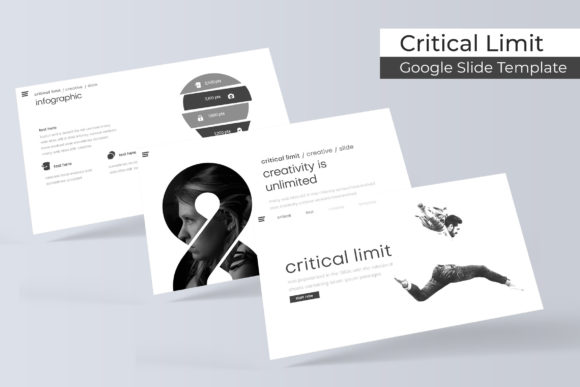
At its core, Critical is built on the principle of structured flexibility. The package includes over 150 total slides, but the real genius is in its organization: five premade color themes, each containing 30 meticulously crafted slides. This means you're not just getting a massive, unwieldy file. You're getting five distinct, cohesive visual identities ready to deploy. Whether your brand is built on deep navy professionalism, clean slate minimalism, or vibrant coral energy, there's a theme that aligns with your story.
The design philosophy here is pixel-perfect illustration. Every icon, chart, and diagram is handcrafted, not pulled from a generic stock library. This attention to detail ensures that your infographics look unique and professional, elevating your data from mere numbers to a compelling visual argument. The slides are based on master slides, a crucial feature for anyone managing a brand. Change a color or font on the master, and it updates across all 30 slides in that theme instantly. This guarantees visual consistency—a non-negotiable for building brand recognition and trust with your audience.
From Internal Reports to Client-Facing Pitches
The practical applications for a template system like this extend far beyond the boardroom. For the small business owner, it’s the foundation for a professional investor pitch or a clear, engaging employee training manual. For the marketing professional, it transforms a campaign report into a visually persuasive story that stakeholders can understand at a glance. The gallery and portfolio slide is a standout feature for freelancers and agencies. Instead of scattering project images across a messy layout, you can present your work in a clean, grid-based format that feels curated and intentional.
Consider the section break slides. These are more than just dividers; they are visual pausing points that help your audience digest information. A well-designed section slide can re-engage attention and signal a shift in topic, improving overall readability and flow. For content creators and bloggers, these slides can serve as beautiful chapter markers in a webinar or a visually rich framework for a course module, adding production value that sets you apart.
Practical Design for Real-World Workflow
A beautiful template is useless if it’s difficult to customize. Critical addresses this with resizable and editable graphic placeholders. The drag-and-drop functionality, combined with picture placeholders, means you can swap out images and resize elements without breaking the layout or fighting with alignment tools. This is a massive time-saver, especially when you’re working under deadline pressure.
The inclusion of handcrafted infographics is particularly valuable. Instead of defaulting to basic bar charts, you can use these pre-designed, visually rich graphics to explain processes, timelines, or relationships. This not only makes your data more engaging but also demonstrates a higher level of care and professionalism to your audience. For a brand strategist presenting a new identity system, these infographics can visually map out brand architecture or customer journeys with clarity and style.
What's in the Box? A Straightforward Toolkit
The package is refreshingly comprehensive and transparent. You receive 5 PPTX files—one for each color theme—in both standard and widescreen formats. This ensures compatibility with different display setups, from a traditional projector to a modern widescreen monitor. The "Readme First" file is a smart inclusion, guiding you through setup and customization, which is especially helpful for those less familiar with presentation software mechanics.
One critical detail to note: the font used in the preview is a free download, with the link included. This is a thoughtful touch that prevents the frustrating "font missing" error and ensures your presentation looks exactly as intended from the moment you open the file. It’s a small detail that speaks to the template’s user-focused design.
Making It Your Own: A Few Considerations
When adopting any premium design asset, it’s wise to think about integration. The Critical template’s clean, modern typeface pairs well with both serif and sans serif fonts. If you’re using it for a corporate brand, consider pairing the template’s headings with your company’s primary brand font for body text to maintain identity. Always test your font pairings on a few slides to ensure they work together visually and don’t compete for attention.
Remember, the included photographs in any template preview are for illustration purposes only. The real power comes from inserting your own images, screenshots, and team photos. This transforms the template from a generic framework into a genuine reflection of your project or business. The editable graphics are your playground—use your brand’s icon set, adjust the color fills to match your palette, and make the infographics tell your specific story.
Ultimately, a tool like the Critical Google Slide Template is an investment in efficiency and professionalism. It removes the friction of design from the presentation process, allowing you to focus on your message. For the entrepreneur building a brand, the marketer launching a campaign, or the designer collaborating with a client, it provides a polished, adaptable foundation that communicates competence before you even say a word. In a world where attention is scarce, starting with a visually coherent and thoughtfully structured canvas isn't just helpful—it's critical.