Cromo Google Slide Template: Crafting a Cohesive Brand Narrative
Struggling to maintain a consistent visual identity across your presentations? You're not alone. Many professionals pour hours into designing slides from scratch, only to end up with a patchwork of mismatched styles. The Cromo Google Slide Template offers a solution built on visual harmony and practical flexibility, designed to help you build a polished brand story from the first slide to the last.
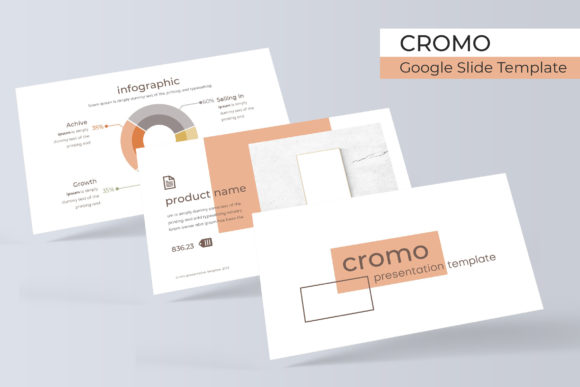
At its core, Cromo is a comprehensive presentation system. It’s not just a single template but a suite of 150+ total slides organized into 5 premade color themes. Each color variation contains 30 meticulously crafted slides, providing a robust foundation for any project. This structure eliminates the guesswork of color theory and layout, allowing you to focus entirely on your message. Whether you're preparing a client pitch, a team workshop, or a creative portfolio, the template's modular design ensures every element works together seamlessly.
Visual Cohesion That Speaks Your Brand
One of the biggest challenges in design is achieving visual consistency. Cromo addresses this by building each slide collection around a unified aesthetic. The 5 premade color palettes are carefully curated to evoke different moods—from professional and corporate to vibrant and creative. This makes it easier to select a theme that aligns with your brand identity, ensuring your presentation reinforces your brand’s personality rather than conflicting with it.
The template includes handcrafted infographics, section break slides, and dedicated gallery and portfolio layouts. These aren’t generic placeholders; they are thoughtfully designed components that help you present data, tell a story, and showcase work in a visually engaging way. The inclusion of picture placeholders that support drag & drop functionality simplifies the process of adding your own images, making the template accessible even for those with limited design experience.
Practical Design for Real-World Projects
Think beyond the boardroom. The versatility of a premium template like Cromo extends into numerous creative and commercial applications. Consider using its structured layouts for:
- Brand Guidelines: Document your logo usage, color codes, and typography rules in a clean, professional format.
- Marketing Decks: Create compelling sales presentations or social media strategy proposals that capture attention.
- Educational Materials: Design course modules, workshop handouts, or e-learning content with clear information hierarchy.
- Project Proposals: Outline scopes, timelines, and deliverables for clients in a visually persuasive manner.
- Event Invitations & Programs: Craft stylish materials for conferences, webinars, or community events.
The resizable and editable graphics are a significant advantage. You can scale elements without losing quality, ensuring your slides look crisp on any screen. Furthermore, the template is based on Master Slides, which means global changes to fonts, colors, or logos can be applied in minutes, saving you valuable time during revisions.
Streamlining Your Creative Workflow
For small business owners and content creators, time is a precious resource. Cromo is designed to be a time-saving design asset. Instead of starting from a blank canvas, you begin with a professional framework. The pixel-perfect illustrations and clean layouts provide a high starting point, allowing you to simply insert your content and customize details.
The package includes 5 PPTX files—both standard and widescreen formats—along with a Readme First document and links to download the free fonts used in the design. This attention to detail ensures you have everything you need to start immediately without hunting for missing assets. It’s a practical toolkit for anyone who needs to produce professional presentations regularly but doesn’t have the budget for a custom design agency.
Choosing and Using Your Template Effectively
To get the most out of Cromo, start by selecting the color theme that best matches your project's tone. A corporate training might benefit from a subdued blue or gray palette, while a creative agency pitch could leverage a bolder, more colorful variation. Don’t feel locked into one set; the modular design allows you to mix and match slides from different color themes if needed, though the pre-curated sets are optimized for harmony.
Pay attention to typography. While the template includes font recommendations, you can pair it with your own brand fonts to strengthen recognition. Ensure that any font pairing you choose maintains readability, especially for body text. The clean, modern layouts of Cromo provide ample white space, which helps prevent visual clutter and keeps your audience focused on the key points.
Finally, remember that a template is a starting point, not a finished product. Use the gallery and portfolio slides to showcase your best work, but always tailor the narrative to your specific audience. The goal is to use the design system to enhance your message, not replace it. With its blend of structure and flexibility, the Cromo template provides a solid foundation for anyone looking to elevate their visual communication and present ideas with clarity and style.