Launch Your Telehealth App Faster with This UI Kit
Building a mobile application from scratch is a massive undertaking. Between wireframing, prototyping, and designing every single screen, the process can feel endless before you even write a line of code. For developers, designers, and entrepreneurs in the healthcare space, the challenge is even greater: you need an interface that feels trustworthy, intuitive, and professional. This is where having a high-quality starting point changes everything. Instead of reinventing the wheel for every button, icon, and layout, you can leverage a comprehensive design system to jumpstart your project.
Why a Dedicated Telehealth Template Makes Sense
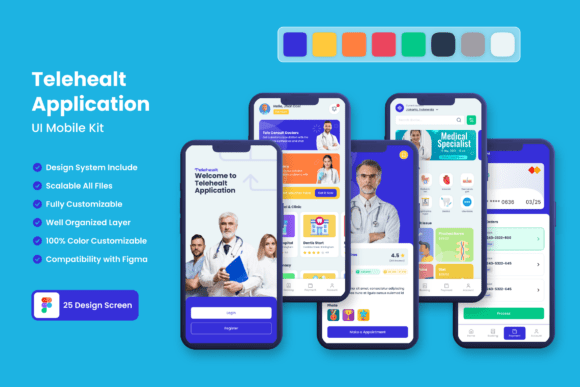
The demand for digital health solutions has skyrocketed, but user expectations are higher than ever. Patients and providers alike expect a seamless experience. A generic app template won't cut it; the context of healthcare requires specific UI patterns—clear appointment scheduling, secure messaging, and easy-to-read health data displays. The Telehealt Application Mobile UI KIT is built with these exact needs in mind. It provides 25 pixel-perfect screen designs that map out the core user journey of a modern health application. Think of it as a pre-built blueprint. You’re not starting with a blank canvas in Figma; you’re starting with a proven structure that you can then mold to fit your specific brand and feature set.
A Closer Look at What You Get
Let's break down the tangible assets included. The kit isn't just a collection of pretty screenshots. It’s a fully editable, layered Figma file designed for real-world use. You get over 80 UI elements—buttons, input fields, cards, navigation bars—that are all constructed with scalable vectors. This means whether you're designing for a small phone or a large tablet, every element retains its crisp, clean quality. The use of symbol objects is a huge time-saver. Need to change the color of a primary button across 20 screens? Do it once on the master symbol, and it updates everywhere. This level of efficiency is what separates a side project from a professional workflow.
The inclusion of free fonts and icon vectors removes another common hurdle: licensing headaches. You can use these assets in your final commercial product without worrying about extra fees or attribution issues. The design style leans modern and clean, prioritizing readability—a non-negotiable in healthcare applications where information clarity is paramount. It’s a system built for visual consistency, ensuring your app feels cohesive from the login screen to the profile settings.
Practical Applications Beyond the App Itself
While the primary goal is building a mobile application, a robust UI kit like this has surprising versatility. The design language—clean lines, thoughtful spacing, and a professional color palette—can inform your entire brand identity. Imagine pulling the primary color scheme and button styles from the app design to create matching business cards, presentation templates, or even a simple landing page website. This creates immediate recognition and strengthens your brand's presence across all touchpoints.
For content creators and marketers in the wellness or tech space, the UI elements are gold for creating social media graphics. A "call to action" button styled in the app's aesthetic can be used in Instagram Stories promoting a webinar. The clean card layouts can showcase testimonials or health tips in a Facebook post. The visual consistency this provides is invaluable for building a recognizable brand on crowded platforms.
Tailoring the Kit to Your Vision
The real power lies in its customizability. The kit is a starting framework, not a rigid cage. Here’s how you can make it your own:
- Color & Typography: While it comes with a suggested palette, you can easily swap out colors to match your existing brand guidelines. The same goes for the fonts. If your brand uses a specific premium font, you can integrate it throughout the designs in Figma.
- Component Modification: Don’t need a complex chart widget? Delete it. Need an extra field in a form? Add it. The layered structure means you can pull apart and reassemble screens like digital building blocks.
- Iconography: The included free icon set is a great foundation, but you can supplement or replace icons with your own set to better reflect your service's unique personality, whether it's more clinical or more friendly.
This adaptability makes it useful for a wide range of projects: a patient portal, a fitness tracker, a meditation app, or a medical consultation platform. The core principle is that the heavy lifting of layout and basic UX patterns is already done, freeing you up to focus on what makes your product unique.
Streamlining Your Design-to-Development Handoff
One of the most frustrating parts of any project is the gap between design and development. Ambiguity in a design file leads to back-and-forth emails, misinterpreted elements, and wasted time. A well-organized UI kit drastically reduces this friction. Because everything in the Telehealt Application Mobile UI KIT is fully layered, properly named, and structured with symbols, a developer can easily inspect the file, understand the hierarchy, and extract assets. They can see the exact spacing, color codes, and font weights used, making implementation more accurate and efficient.
This level of organization also benefits you as the designer. It encourages a systematic approach to your work. Instead of designing one-off screens, you’re thinking in terms of a reusable system. This habit is crucial for scaling any digital product and is a hallmark of professional modern typography and UI practice.
Getting Started: A Practical Checklist
Ready to dive in? Here’s a quick guide to using the kit effectively:
- Define Your Core Flow: Before you even open the file, map out the 3-5 most critical user journeys in your app. Use the provided screens as a direct starting point for these flows.
- Establish Your Brand First: Have your logo, primary color, and secondary color decided. This will make the customization phase in Figma much smoother.
- Iterate in Phases: Don’t try to redesign every screen at once. Start with the core flow, get feedback, and then expand to secondary features using the remaining templates as a guide.
- Test on Device: Use Figma’s mirror feature or prototype mode to preview your designs on an actual phone. Check for tap target sizes and readability on a small screen.
This methodical approach ensures you’re not just decorating screens, but building a functional, user-tested foundation for your application. The kit provides the parts; your vision and strategy assemble them into something valuable. In a competitive market, this kind of head start isn’t just convenient—it can be the difference between a project that launches and one that stalls in the design phase. By focusing on customization and strategic application, you transform a collection of templates into a powerful tool for bringing your telehealth concept to life.